Monday, October 24, 2011

Android Market Applications Problem Discovered

Okay here is it.. I always wondered why does the market clean all the apps when I clear the mobile log or clean cache.. Well I never found a solution untill I was installing some apps sometime back and noticed that different apps were getting installed with different gmail ID's I have on my Android.

If you have more than 1 gmail id's you are using on your mobile, go to the Market, Options, Accounts, change the gmail accounts and again go to Options, My Apps and see different apps in different gmail id's.. Weird right..

Trying to find a solution to this now, your comments are welcome to sort this out..

Friday, October 21, 2011

Whatsapp Messenger Updated to v2.6.8990


One of the most used messenger, Whatsapp has got an update on Android devices. It is updated to V 2.6.8990.

Update/Download it from here ( http://goo.gl/Ja7qx). You can do it directly on your Android Device.

The notification logo has changed and looks better now. The services have become faster, the messages get delivered instantly. This is what we have noticed till now.

Wednesday, October 19, 2011

App Review - TubeMate - Download You Tube Videos at Ease

Love watching Videos? YouTube addict? Have an Android? Love music and wanna have it from YouTube to your mobile within seconds? Here's the solution.. download any you tube video from on your Android mobile using this app called TUBEMATE. Super simple to use and operate.. Not only download but you can use this app as your default you tube application on your mobile.

Sign in to your you tube account, subscribe to various up-loaders, upload videos and do everything you want by tapping your super sexy touch screen..


You see 4 grey icons on the bottom right of the above screenshot. The first one is for sharing, second for refresh, third for downloaded videos and forth one for searching.


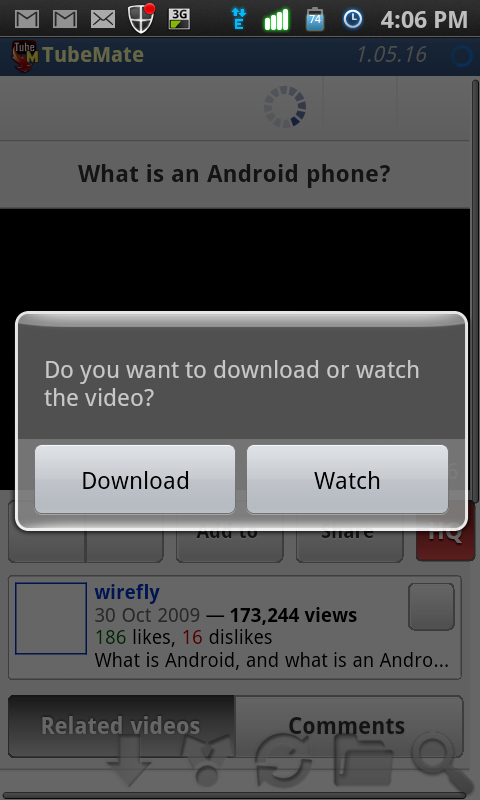
When you open a video and click on it, you see two options.. 1. To download the video and 2. To watch it.


When you click on Download option, it starts fetching the information and gives you various options. Different sizes of videos according to what size you want can be downloaded. If the video has HD version for mobiles which support High Definition videos, you get the option for them as well and there are a few ones which are also available for tablets.


Happy Downloading ;)

Specs Comparison between GALAXY NEXUS and Galaxy S II


Specs Comparison between GALAXY NEXUS and Galaxy S II (i9100)


    Samsung Galaxy Nexus
    Samsung Galaxy S II
   OS
Android 4.0 Ice Cream SandwichAndroid 2.3 Gingerbread
   Processor1.2 GHz Dual Core Processor1.2 GHz Dual Core ApplicationProcessor
   Display4.65” (1280X720) HD Super AMOLED4.27" WVGA (480×800) Super AMOLED Plus
  Camera (Rear)5 MP AF with LED Flash, zero shutter lag and fast shot2shot8.0 Mega Pixel Camera AF with LED Flash
  Front Camera1.3 MP for Video Call2.0 MP Camera
  Video1080p Full HD video Recording and Playback @ 30fps1080p Full HD video Recording & Playback @ 30fps
  Memory1GB RAM1GB RAM
  Storage16GB/32GB Internal memory
16GB/32GB Internal memory
  External StorageNo supportUp to 32GB via MicroSD card
  NetworkHSPA+ 21Mbps/HSUPA 5.76Mbps (LTE version available depending on the region)HSPA+ 21Mbps/HSUPA 5.76Mbps
  Dimension135.5 x 67.94 x 8.94mm125.3 x 66.1 x 8.49mm
  Weight135g116g
  Battery1750mAh1650mAh
  Connectivity
Bluetooth v3.0 
USB 2.0 
Wi-Fi 802.11 a/b/g/n (2.4GHz/ 5GHz) 
NFC
Bluetooth v3.0+HS 
USB v2.0 
Wi-Fi a/b/g/n
  ConnectorsMicroUSB, 3.5mm Ear JackMicroUSB, 3.5mm Ear Jack
  ColorsSingle ColorBlack, White


Source: Webtrikz.com

Tuesday, October 18, 2011

iPhone Galaxy S2 or Samsung iPhone S2 ;)

Are you an iPhone lover and recently shifted to Android?? Now you can have the looks or an iPhone on your Android mobile.

Make you Samsung Galaxy S2 or for that matter any Android device into an iPhone.. Go to the market and download this app. Its a launcher like Go Launcher, Shell 3D launcher etc.

Download it from this link :  https://market.android.com/details?id=mobi.espier.launcher

I have tried this for a couple of hours now on my Samsung Galaxy S2, no crashes faced yet. Everything works well. You can search for the apps or anything on your mobile like you do on an iPhone as well. Here are some screenshots from my device.

The icons have changed to cubes like they are on an iPhone, but everything inside the apps is the same as they open by default on Android.


Create folders simply by dragging one app on the other/overlapping them. Rename folders. Have the same look (obviously not the feel cuz' inside its basically Android) of an iPhone.


Get that shaky feeling when u wanna move or delete apps on this launcher. Just hold any app and they start vibrating/shaking and then your free to move them, create folders, delete apps..


Happy using an Android OS with the look of an iPhone!! But just the look.. From inside, Its Android which rocks!


Related Posts Plugin for WordPress, Blogger...