Showing posts with label Galaxy Nexus. Show all posts

Wednesday, April 3, 2013

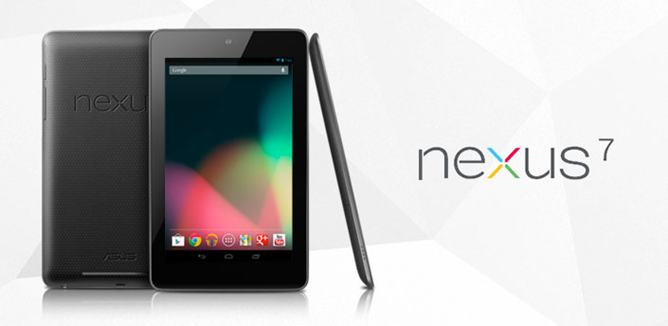
32 GB Nexus 7 to be available in India from Next Week


nexus
16GB Nexus 7 is available on the Indian Play Store but if you’re on the lookout of a 32GB or a 3G variant, Asus just announced the pricing for the Indian market. Expected to be available from next week, the 32GB Nexus 7 will sell in India for 18,999 whereas the 3G variant with 32GB of internal storage will go for Rs. 21,999.
Both the variants will run the latest Android Jelly Bean OS and feature a 7-inch 1280×800 pixel display, Nvidia Tegra 3 processor, 1GB RAM, Wi-Fi, Bluetooth 3.0, GPS and front-facing 1.2MP camera.

Wednesday, November 14, 2012

Download Android 4.2 on Samsung Galaxy Nexus

Yes Yes Yes, We have a good news for you. Most of the folks who are on Stock Rom on their Galaxy Nexus have got the OTA updates for the latest Android Rom, Android 4.2.

You can download and flash it manually as well. Follow the procedure and do it in minutes.

Download the rom from this link: DOWNLOAD
No, their is no separate GAPPS (Google Apps) file for this. All the Google apps are built in.


Follow this (Your phone has to be rooted):
1. Copy the file in the memory of your Nexus.
2. Backup all the apps if you wish to (you will loose all the apps and its data) via Titanium Backup.
3. Go to recovery/CWM and Wipe Cache, Wipe Data and Factory Reset, Go to mount and storage and Format Cache, Format Data, Format System. (DO NOT format SD card, you will loose all your pics, music, videos and all the personal files).
4. Go back and go to Install zip from memory. Select the file where you copied it and flash it.

Reboot and you are done. :D

You are the lucky one with Android 4.2 now on your Galaxy Nexus device.

Flash it and lemme know how you like it. I found it smooth and really link some of its features. More on it, coming soon.

Thursday, October 25, 2012

TouchWiz Jelly Bean Addon for Galaxy Nexus


Update Addon 1.3.1

- updated launcher to Samsungs official Jelly Bean release

- fusion of Nexus 7 and Galaxy nexus Launcher => allows a single addon for Nexus devices


- added smalldookies HD Wallpaper Picker Mod

Installation:
- Copy the file in your memory on your galaxy Nexus or your Nexus 7 (Same file for both the devices).
- Reboot device into recovery
- Recommended: Wipe cache & delvik cache
- Install file from sd card, select the file and flash and reboot. 
  
DOWNLOAD

Source: XDA

Monday, October 22, 2012

Kangerator - The AOKP ROM Downloader


Here's the Good news for the folks who use AOKP ROM's on your mobiles specially on the Samsung Galaxy Nexus. Now you don't have to go to your computer or find the site on your browser to find and then search and download the latest AOKP ROM. We have an app Available right in the Google Play Store :D Here is the link : Kangerator

Thursday, June 28, 2012

Jelly Bean 4.1 for Nexus GSM - DOWNLOAD

The latest Version of Android - 4.1 Jelly Bean is ready for download for Google Nexus - GSM version mobile.

Stock JRN84D from Google I/O for GSM Galaxy Nexus

Root fix is below. Flash additional file in CWM!
Download :
http://goo.im/roms/fabolous/maguro/b...x_deodexed.zip

http://minus.com/mzDX1IrjJ/ (Mirror Link)
md5sum: 
2b96b2d080301f72114b0cb8bd7268f1 bigxie_JRN84D_rooted_busybox_deodexed.zip

Fix root with this (flash in CWM):

http://www.mediafire.com/?ke2cnhlo09xh6v4
http://goo.im/roms/fabolous/maguro/C...erSU-v0.89.zip (Mirror Link)

CWM Flashable Radio (XXLF1) (credit b16, birdman, rootz crew)

http://www.mediafire.com/?gh52iny0ytm1fka
http://minus.com/mC6NyCwwH/ (Mirror Link )

Instructions :
  • Download the zip above attached ( deodexed zip , su(root).zip and radio files)
  • Transfer the files to the phone
  • Wipe Data,cache
  • Install the zip ne by one 
  • First deodexed.zip
  • Select su.zip and radio.zip
  • Reboot and enjoy 

Wednesday, June 27, 2012

Nexus 7 Tablet Specs

It's what we've all been waiting for, folks: Google and ASUS have announced the Nexus 7, a pure Google tablet that lets you take advantage of all the goods they're offering up in the Android market. But forget the software for now (we'll get into that later): let's talk specs.


It has a 7 inch 1280×800 display, Tegra 3 chipset, a front-facing camera, 9 hours of HD video (talk time in tablet speak) and 300 hours of standby time, WiFi, Bluetooth, and NFC. It's only 340 grams light so it's very easy to hold.

It's got a nice helping of power no doubt, but Google surprisingly wasn't interested in running down a list of mundane specs. This device is all about experiences.

You can read a book or magazine on your phone, and pick up where you left off on the tablet. They'll give you movie and TV show recommendations based on what you watch.

They'll let you find out what music you're listening to in an area if you don't know what it is. All of these apps have been optimized specifically for tablets, and Google's pushing them heavily on the Nexus 7. We'll be bringing you even more updates as we get them.


First CyanogenMod 9 release candidate published, available for 50 Android devices

Well Im excited cuz' this is officially available for Nexus ;)


The CyanogenMod team has been busy crafting their customized version of Android 4.0 since its code first hit Google's open source database, going through months of nightly test builds to perfect the latest version of the popular smartphone ROM. Now CyanogenMod 9 has officially reached release candidate status, and you can get it now.

CM9 is available for a collection of 50 different Android devices covering both phones and tablets with more sure to be added over the coming days and weeks. For the moment this includes the Samsung Galaxy Nexus, ASUS Transformer Prime, and the HTC Sensation among others. To download the release candidate and install head on over to Get.CM.

Go to www.get.cm and select your mobile version and download the file. Copy it to your sd card on your Android, go to recovery mode and wipe the data (make sure you take a backup before wipind off your data), flash the file you copied.

You are good to go :)

[Get.CM via DroidLife]

Friday, June 22, 2012

Android 4.1 - Jelly Bean - Soon to be available on Galaxy Nexus

Everyone expects Android 5 to be the Next big thing and a change to Android's eco system but Google has its own plans.. A huge break out today says that Android 4.1  will be the new Android - named Jelly Bean..


Android plans to jump into Jelly Bean Business soon this year releasing it for its very own Google Nexus :D Aint that a great news? People all around the world buy Nexus to have the first hands on and impressions of Android's latest releases and everyone including me are waiting for "Whats Gonna Be New??" in the next version of Android, let that be Android 4.1 or Android 5.. No body really cares.. All everyone wants is - SOMETHING NEW to play with.


Guess someone accidentally pressed a wrong button to release this on the play store today and some one was really quick to capture this. Lets hope we get some official news about this really soon.

Google's new - Nexus Tab should mostly come out with the new Android 4.1 Jelly Bean. Lets keep our fingers crossed and wait for the good news from Google..

Source: Androidpolice
Pic: Phandroid

*All the written content is my own :D

Saturday, June 9, 2012

Samsung Galaxy Nexus with the SGS3 Add-On

One of the most happening mobiles around the world, The Google Flagship mobile, Nexus (Samsung Galaxy Nexus) gets the Samsung Galaxy S3 Add-On package.

What is it?
It is a Flash-able Package for your Nexus which Revamps the display and looks of your mobile totally to make you get a feel of using a Samsung Galaxy S3. 

Ofcourse, you wont get that watery movement on your lock screen which the Samsung Galaxy S3 has, that's made for the human phone, the Samsung Galaxy S3.  But everything else like the wallpapers, sounds, ringtones, looks, icons, brightness and colourful display make you feel that you have an S3 in your hands. 

It has the Samsung's new TouchWizUX launcher with loads of S3's apps (Music, S3 memo/notes, weather etc).


Thats the home screen with the original Weather App  and some icons extracted form from S3.


The Colourful settings page which looks more interactive and attractive.


Your Nexus needs to be rooted to flash this S3 Add-On and get these looks..

XDA member madphone says: “This Addon Pack is meant to bring Galaxy S3 feeling to Googles Galaxy Nexus”.

Source: XDA

You can get the latest versions for download: HERE

Leave a comment if you have any doubts regarding this :)

Related Posts Plugin for WordPress, Blogger...